Preview
Install
copilot plugin install foundry-agentic-loop@awesome-copilotOr open Foundry Agentic Loop Canvas directly in the Copilot app.
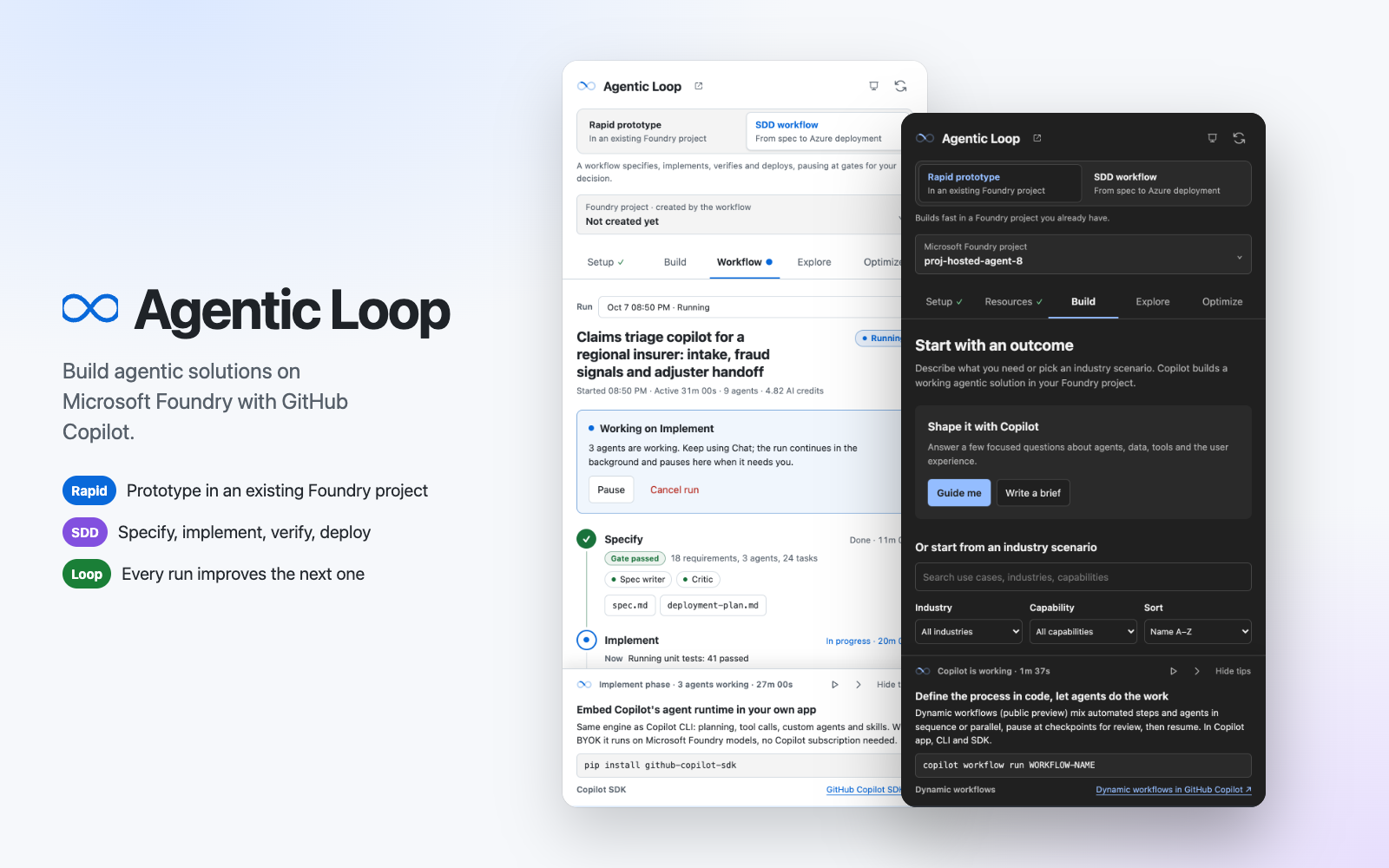
The GitHub Copilot App side panel for the foundry-agentic-loop plugin. It covers the whole Agentic Loop on Microsoft Foundry: check readiness, choose where to build, start from a prompt template, follow the build live, then explore and improve the solution. Canvas ID: foundry-agentic-loop-canvas.
Modes
| Mode | Builds | When |
|---|---|---|
| Rapid prototyping (default) | In an existing Foundry project, from Chat | Demos, workshops and exploring an idea |
| SDD | A new Foundry project, deployed with azd by foundry-agentic-loop-workflow |
Selected automatically when the session has workflow runs, or chosen on the Start tab |
Both modes use the same four tabs; only the content of Start and Build adapts.
The header's Microsoft Foundry project field names the active project. In rapid mode, select it to change the project; in SDD, it opens Build until the workflow creates the project, then Explore. The Foundry logo at its start opens the project in Foundry Portal, in the directory of the project's subscription.
Once a build starts, the Agentic Loop section of the workspace root AGENTS.md locks the mode. The mode switch on Start then shows a lock, disables the other mode and offers Open AGENTS.md. To switch, ask Copilot in Chat; it confirms first, then rewrites the section.
Tabs
| Tab | What it does |
|---|---|
| Start | The mode switch, then three steps. Readiness checks the plugins, extensions, CLI tools (azd 1.32.0 or later) and Azure sign-in, offers a Chat prompt for each gap and collapses once ready. Foundry project (rapid) discovers projects across subscriptions and stays in sync with FOUNDRY_PROJECT in the workspace .env; Deployment target (SDD) sets the subscription, region and azd environment. Choose a prompt template opens a gallery: Shape it with Copilot comes first, then 61 industry templates you can search, filter by industry, capability, building block and pattern, sort, and show as a gallery or list. Review or edit the prompt, optionally turn on Boost with Work IQ, then Send to Chat. A rapid prototyping prompt needs a selected Foundry project, so Send to Chat stays disabled until you choose one; SDD creates its own project. Sending locks the template for the session and opens Build. Until Copilot starts building, Unlock lets you edit the prompt or choose another template; in SDD you can also edit it and start a new run |
| Build | Rapid shows the milestones Copilot records in the workspace (loop started, project linked, solution designed, hosted checkpoint, running locally, deployed; agent-only solutions mark the app steps not applicable) and the short commands Run locally, Run tests, Deploy and Convert to SDD. SDD follows each workflow run live: phases, gates, agents, artifacts and the activity log. Approve the spec or deployment, request changes, resume, pause or cancel. Completed runs show their outcome and endpoints; verified runs offer Deploy from Chat. When the build finishes (the app runs locally, an agent-only checkpoint passes or a run completes), the canvas opens Explore. Like opening Build when a build starts, it moves focus to the tab and announces why; while you are typing or a dialog is open, a notice offers the tab instead. If live updates fail for 15 seconds, a banner says so until they reconnect |
| Explore | Opens the local and deployed apps, lists agents, model deployments, toolboxes and resource-group resources, and launches Agent Inspector |
| Optimize | Starts the Foundry Agent Optimizer, automatic evaluations, an Agent Insights scan or Improve the loop, and shows session usage and month-to-date Azure spend |
After Copilot has worked for 30 seconds, a tinted enablement dock rotates 21 short tips that match the build mode and active SDD phase. Each tip shows its source (Microsoft Foundry, Azure, GitHub or Agentic Loop) and, where it applies, how the loop uses it. 15 link to Microsoft Learn, 3 to GitHub (Copilot SDK, Spec Kit and dynamic workflows) and 3 to this plugin. It respects reduced-motion settings. How it works opens a five-slide deck (public/deck.html) that takes an idea through Work IQ context to a rapid prototype or the SDD workflow, and covers the Microsoft Global Black Belt best practices the loop embeds.
Safety
- Each Chat action starts a Copilot turn. Only a Start prompt template opens for review and editing; it is sent when you select Send to Chat. Request changes sends a fixed change request with the feedback you type. The other Chat buttons, such as Set up in Chat, Guide me, Run locally, Fix in Chat, Inspect locally and Deploy from Chat, send a fixed prompt for their step as soon as you select them.
- The panel server listens on
127.0.0.1only. It requires a per-panel token, applies a strict Content Security Policy and accepts only actions validated against their schemas. - Boost with Work IQ is off by default. When on, prompt templates ask Copilot to query the
workiqMCP server for relevant Microsoft 365 context, cite it by source type and confirm it with you, without copying confidential content into the workspace. The canvas only checks whether that server is configured; it never reads Microsoft 365 data. - The canvas reads only
FOUNDRY_PROJECT,LOCAL_FRONTENDandDEPLOYED_FRONTENDfrom a workspace.envof at most 64 KB, and never parses its other lines. A.envit cannot read only shows a warning; project discovery still runs. It accepts only validated Foundry project ARM IDs, and links only tohttporhttpsURLs without credentials. FromAGENTS.mdit uses only the Agentic Loop mode marker; ifAGENTS.mdor the workflow runs cannot be read, mode changes and sends stop with an error instead of acting on stale state.
Tests
From this folder run npm test. From the repository root:
node --test extensions/foundry-agentic-loop-canvas/tests/*.test.mjs